Managing Views
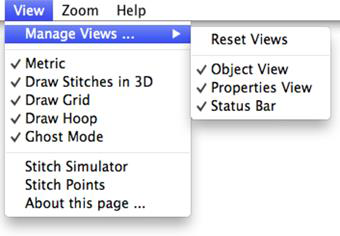
This interface can be configured and the configuration is persistent, i.e. it is remembered between program invocations. The Objects and Properties views along with the Status Bar can be hidden (individually or together) via the View > Manage Views… menu. Clicking a menu option will toggle its current state. Checked views are enabled, unchecked are hidden.
If you have a small screen and a design with a lot of objects, you may want to hide the Properties view so that the Objects pane can be expanded. Similarly, you may want to hide both views to maximize the Main view for designing.
If you have a really large monitor, you may want to adjust the divider to shrink the Objects and Properties views to their minimum width.